• Skip to main content
  • Skip to secondary navigation

Mink Hollow Media

Democratizing Information Technology

  • About Us
    • Katrin Becker
  • Newest
  • In Development
  • Contact Us
  • Teaching & Learning
  • Games
  • Memoir
  • Programming
  • Science
  • Art
  • All Books

8: Visualization

Chapter 8

Here’s were we will put color versions of the images, updates, and other extras.

The point of any simulation is to answer some question or set of questions. To that end, how the ‘output’ gets presented and displayed will profoundly affect how useful a simulation is. This chapter will provide an overview of the typical formats for simulation output, and talk about the relative strengths and weaknesses of each.

wordle-ch08-feb-13

  1. The Many Faces of Simulation Output
  2. Text
    1. Example 1: Simple Harmonic Motion Simulation
    2. Example 2: Single Server Queue
  3. Graphics
    1. 2D Graphics
    2. Graphs and Charts
    3. 3D Graphics
    4. Displaying 3D Meshes
  4. Animations
    1. What Is An Animation?
    2. Interactive Animations, Games, and Virtual Reality
  5. Sound
  6. Summary
    1. Concepts
    2. Terminology
  7. References, Notes & Further Resources

Images

*Please note: all images are copyrighted, permission to use an image must be obtained from Wiley (and possibly also the original sources).

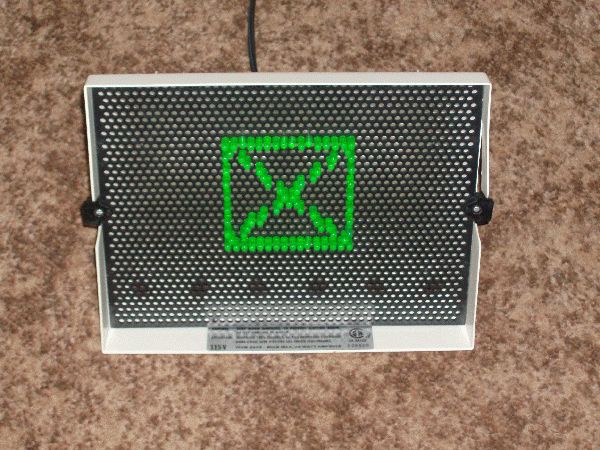
 

Figure 8-1: A spring and weight system that will be the basis of a simulation. The distance the weight is moved from its starting position determines the force the spring exerts to restore the weight.
Figure 8-2a: – Raster graphics (a) A toy that can be used as an excellent illustration of the principle of raster graphics
Figure 8-2b: – Raster graphics (b) A raster image is an array of numbers (top) that represents grey level values (center) or colors, that in turn can represent lines (b) and shapes.
Figure 8-2c: – Raster graphics (c) A computer display and television screen both consist of sets of pixels close together. Each red, green, and blue bar together represents one pixel, and there are 158000 pixels in a standard U.S. broadcast TV picture.
Figure 8-3: – Graphical representations of the spring/-weight system that forms the basis of our simulation.
Figure 8-4: – Drawing a graph of the spring simulation results using Excel.


Figure 8-5: – Different graphs of the same data, focusing on different aspects.
Figure 8-6a: Using a logarithmic axis for graphing variables. (a) Graph of y = x2
Figure 8-6b: Using a logarithmic axis for graphing variables. (b) The same graph, but with the vertical axis as log(x2)
Figure 8-6c: Using a logarithmic axis for graphing variables. (c) Both axes on a log scale.
Figure 8-7a: Building objects from polygons only approximates the true shape of a complex object, but this can be a pretty close approximation, and it is easier to do this way on a computer. (a) Drawing triangles that share edges can save space and time.
Figure 8-7b: Building objects from polygons only approximates the true shape of a complex object, but this can be a pretty close approximation, and it is easier to do this way on a computer. (b) Folding along edges in the third dimension gives shape and volume to the object.
Figure 8-7c: Building objects from polygons only approximates the true shape of a complex object, but this can be a pretty close approximation, and it is easier to do this way on a computer (c) The more polygons that are used, the more accurately we can represent the true shape, in this case a sphere.
Figure 8-8: – A viewing transformation maps the 3D coordinates of the object onto 2D coordinates of a viewing plane, taking into account the relative 3D position of the viewer. The viewing plane has 3D coordinates, but because they lie on a plane the third dimension can ultimately be removed, and the resulting 2D image mapped directly onto a computer screen.
Figure 8-9: – The sequence of animation frames resulting from the simulation data in Ttable 8.8-1. There are 70 frames in one complete cycle, and this set is sampled every 7 frames.
Figure 8-10a: Parts of an interactive simulation—a video game named The Booze Cruise. (left) The car used in the game. It consists of over 57000 triangles.
Figure 8-10b: Parts of an interactive simulation—a video game named The Booze Cruise. (right) The car rendered within the game. The complete context is now visible; there are about 20 objects present here.

Copyright © 2026 · Author Pro on Genesis Framework · WordPress · Log in